
Data Sources
Connect relational databases over JDBC, plus text files, Excel, CSV, and HTTP APIs. Configure connection pooling, test connectivity, and manage credentials.
Supported Data Source Connections
- Relation Databases
- Text Files (TXT, Excel, CSV)
- HTTP APIs
Relational Databases (JDBC)
We do not maintain a list of supported database vendors, as it would provide little practical value. If a database is JDBC-compliant, it is generally supported.
In practice, almost all relational databases can be connected through JDBC.
Occasionally, a database may require minor SQL syntax adjustments due to vendor-specific differences. These issues are typically straightforward to identify and resolve.
If you encounter any SQL syntax errors, please submit a ticket to the Help Desk and include:
- The complete exception stack trace from the backend logs
- The database product and version
- Steps to reproduce the issue
Our team will investigate and provide a fix as quickly as possible.
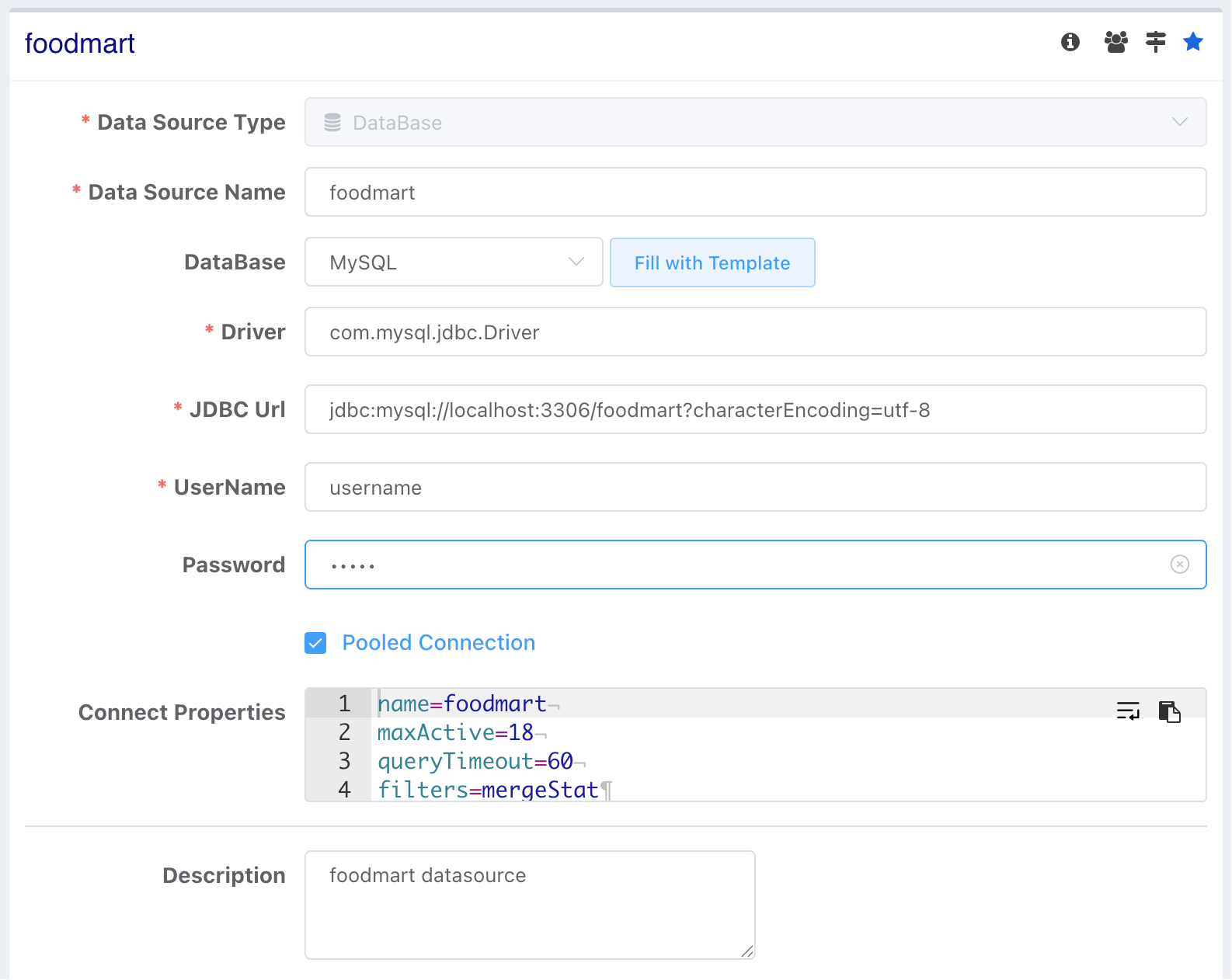
- After completing the configuration, click Test to verify the database connection.
- Use Connection Pool: Enables the Druid connection pool for managing database connections.
- Data Source Aggregation: Uses the default query engine. Query statements are dynamically generated based on the user's drag-and-drop configuration and executed directly on the data source. For more information, see Performance Optimization.
Why Use a Connection Pool?
A connection pool reuses database connections instead of creating a new connection for every request. This improves performance, reduces resource usage, and is recommended for production environments.
Connection Properties
Most users only need to configure the standard JDBC connection properties (such as URL, username, and password). Additional connection properties and connection pool settings are optional and are primarily intended for database administrators or advanced users.
JDBC Connection
Any custom connection properties you configure are passed directly to the JDBC driver when establishing the connection.
Implementation Details
The connection is created in the same way as the following Java code:
String driver = dataSource.get(DRIVER);
String jdbcUrl = dataSource.get(JDBC_URL);

Class.forName(driver);

Properties props = new Properties(getDsrProps());
return DriverManager.getConnection(jdbcUrl, props);
Connection Pool (Optional)
Connection pool settings are only required if Use Connection Pool is enabled. In most cases, the default values are suitable.
| Property | Default | Description |
|---|---|---|
| initialSize | 0 | Number of connections created when the pool is initialized. |
| maxActive | 10 | Maximum number of active connections. |
| minIdle | - | Minimum number of idle connections to keep. |
| maxWait | - | Maximum time (ms) to wait for an available connection. |
| maxIdle | 8 | Deprecated. This property has no effect. |
Hive
Although Hive provides a JDBC driver, its query latency is typically too high for interactive analytics. Therefore, using Hive as a real-time query data source is not recommended.
HTTP
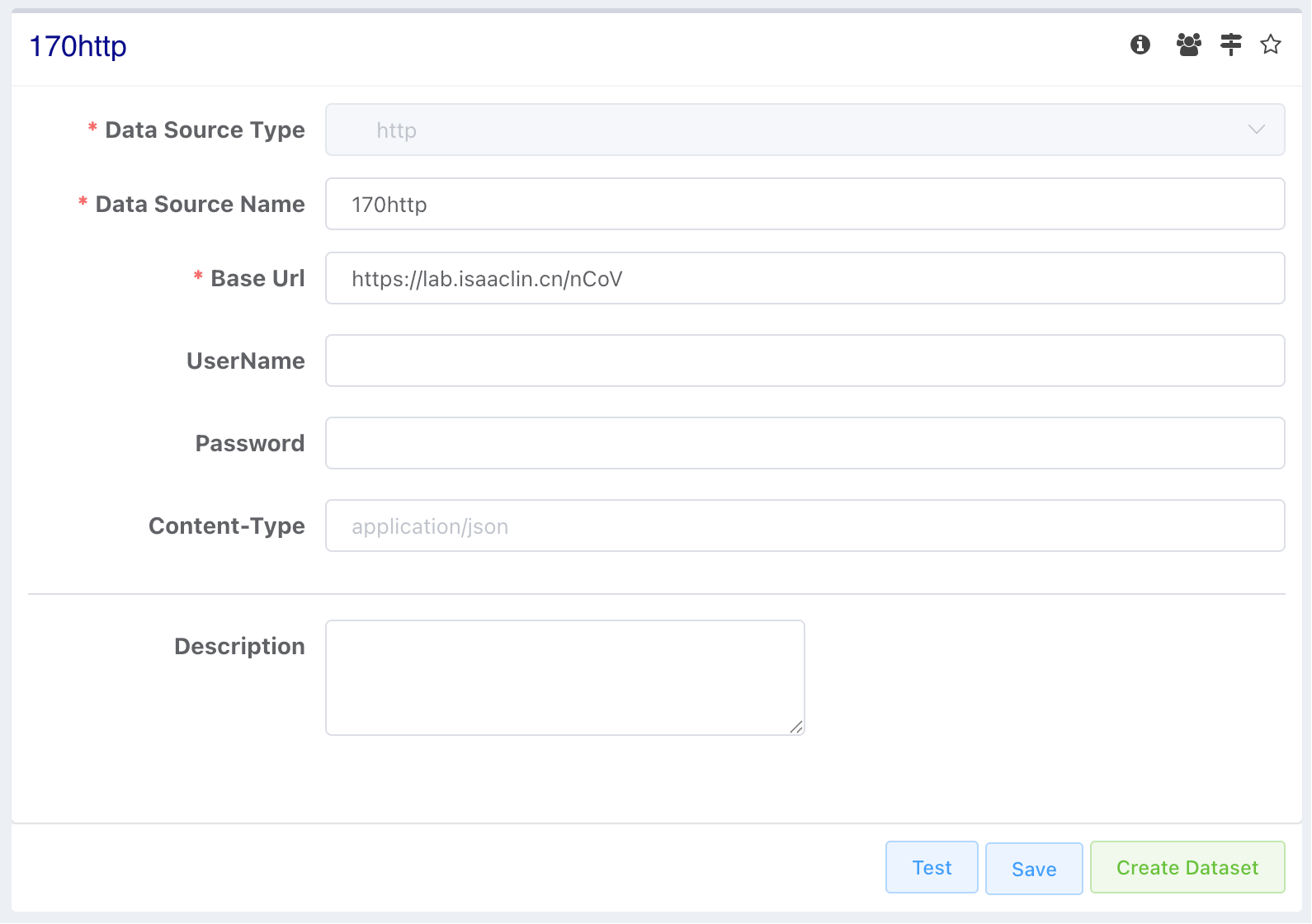
HTTP Configuration
- Service URL: The base URL of the HTTP service. Do not include a trailing slash (
/), as it will be automatically combined with the request path. - Username / Password: Currently supports Basic Authentication only. Leave these fields empty if authentication is not required.
- Content-Type: Optional. If not specified, the appropriate Content-Type will be determined automatically based on the request body.
Folder System
Data sources, datasets, charts, and dashboards share one folder tree. Create, rename, move, and delete folders, and control permissions per folder.
Database Dataset
Define a dataset with a SQL query against any JDBC source. Covers query caching, variables in queries, CTAS and WITH subqueries, and graphical modelling.