
Embedding Dashboards as iframe
Embed a dashboard or a single chart into your own application with an iframe. Covers share-ID and token authentication plus URL filter parameters.
Embedding Dashboards as iframe
Integration Auth
For page access security, IBI supports the following authentication methods:
- Authentication via the share ID generated by dashboard sharing, parameter:
shareid. The shareid contains dashboard ID (boardId) information. - Authentication via username and password, parameters:
userName/password. The password supports plaintext or MD5 encrypted authentication. - Authentication via JWT token, parameter:
token.
Authentication Check Priority
token > shareid > username and password
Single Dashboard (PC)
The URL format for single dashboard integration is as follows:
https://bi.epivotlabs.com/appname/render.html?[key=value]For external system integration, the dashboard sharing feature can be used to generate an accessible link from outside. The operation is as follows:
Free Layout Dashboard → Share → Select a sharing link validity period → Click Add:
After that, the dashboard can be accessed elsewhere. The dashboard accessed via this link does not include the surrounding menu bar and dashboard parameters.
Filter Parameter by URL
Keys are case-sensitive; this will not be repeated in subsequents.
| Key | Description | Default |
|---|---|---|
| shareid | Generated via dashboard sharing. The shareid contains the dashboard ID and the dashboard parameter state when the sharing instance was created. | |
| boardId | Dashboard ID. Not required to pass if using shareid. | |
| showParam | Global control to show/hide the parameter bar on the dashboard. Acceptable values: 0/1, true/false. | true |
| hiddenPNames | Controls hiding specific parameters in the parameter bar. Pass an array of parameter names, e.g., ['Parameter Name 1','Parameter Name 2']. | |
| showTitle | Controls whether to show the original dashboard title. Acceptable values: 0/1, true/false. | true |
| showExport | Controls whether to show the export button. | false |
| filters | Controls the filter content of dashboard parameters. The value format is a JSON object. | |
| locale | Multilingual support, only affects system menu items. | cn/en |
| Other Parameters | Other parameters will be interpreted as environment variables. |
Parameter Details
showParam
Global control to show/hide the parameter bar on the dashboard. Acceptable values: 0/1, true/false. If not provided, defaults to showing the parameter bar.
http://localhost:8088/render.html?shareid=N9SYIQ9r&showParam=false
http://localhost:8088/render.html?shareid=N9SYIQ9r&showParam=0
hiddenPNames
Controls hiding specific parameters in the parameter bar. Pass an array of parameter names. For example, the following request can hide the parameter named User on the dashboard to prevent users from modifying it.
http://localhost:8088/render.html?shareid=N9SYIQ9r&hiddenPNames=['User']Parameter names can be compatible with both single and double quotes.
showTitle
Controls whether to show the original dashboard title.
http://localhost:8088//render.html?shareid=N0zt6xJw&showTitle=false#/showExport
http://localhost:8088//render.html?shareid=N0zt6xJw&showExport=true#/filters
The state of dashboard parameters can be set by passing a JSON object (generally generated by external integration system code). The specific format is as follows:
{
    "boardParams": [
        {
            "id": "mpgxi01ev6k",
            "name": "User",
            "type": "=",
            "values": ["aaa", "bbb"]
        },
        {
            "id": "2khmtv1s63p",
            "name": "User Name",
            "type": "=",
            "values": []
        }
    ]
}- This JSON object can be extracted via the
URL Parameter Tool. Users decide whether to URL-encode it before passing based on the complexity of parameter values.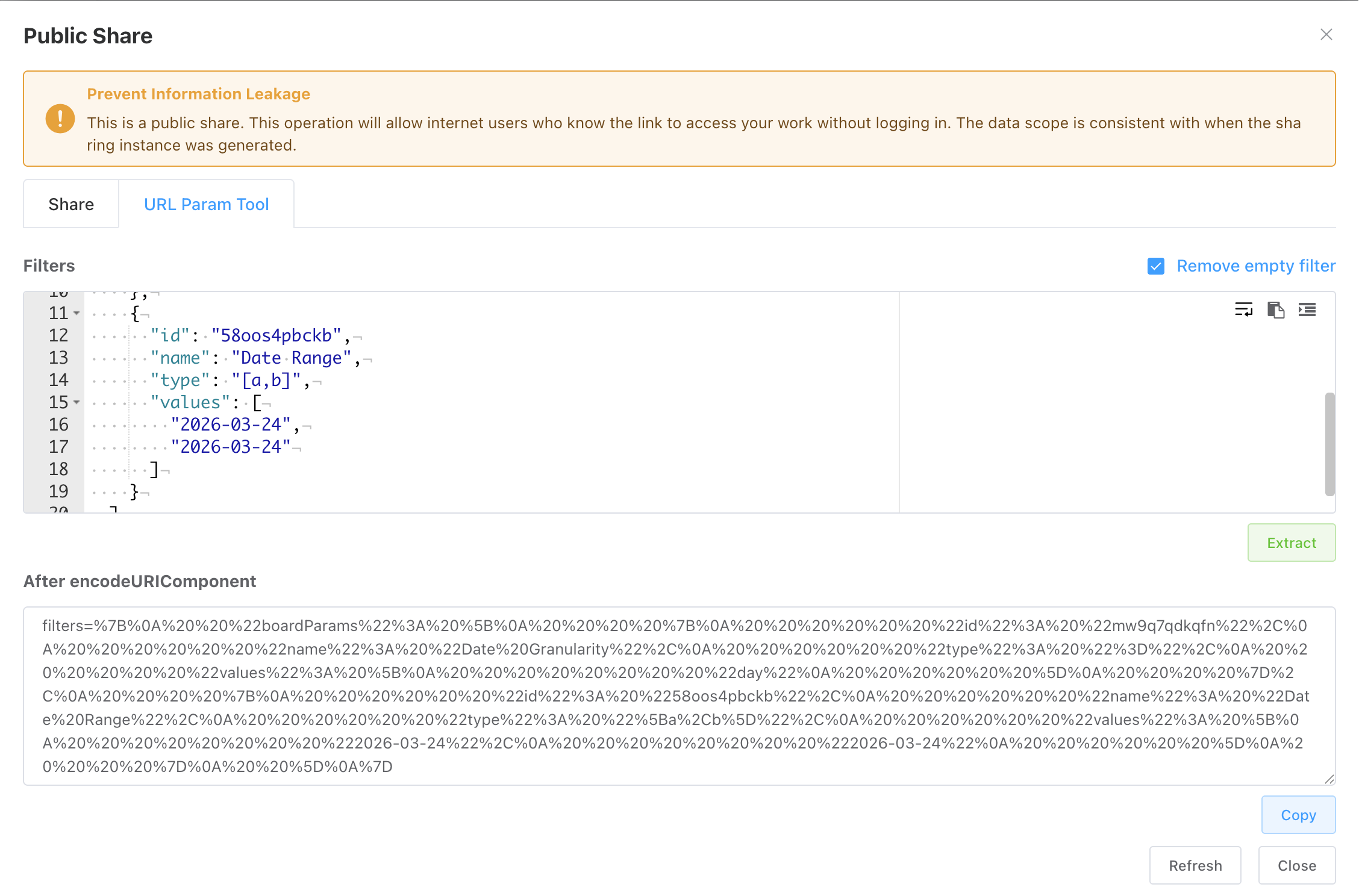
- Association with parameters on the dashboard is via the
id. Items that cannot be associated are discarded. Thenameproperty in filter items is optional; removing it can reduce parameter length. type: Different parameter types have differenttypevalues. It is recommended to check and debug via theURL Parameter Toolbefore setting.const EQ = '=', NEQ = '≠', GT = '>', LT = '<', GET = '≥', LET = '≤', LIKE = 'like', NOT_LIKE = 'not like', GEL = '(a,b]', EGL = '[a,b)', GL = '(a,b)', EGEL = '[a,b]';
| Parameter Form | Supported Types |
|---|---|
| General Filter | Supports all types |
| Date Range | Supports closed interval [a,b] |
| Checkbox, Dropdown | Supports equality filter = |
| Keyword Input | Like |
http://host/render.html?shareid=N9SYIQ9r&filters={"boardParams":[{"id":"mpgxi01ev6k","name":"用户","type":"=","values":["aaa","bbb"]},{"id":"2khmtv1s63p","name":"用户名","type":"=","values":[]}]}

// After applying encodeURIComponent to filters
http://host/render.html?shareid=N9SYIQ9r&filters=filters=%7B%22boardParams%22%3A%5B%7B%22id%22%3A%22mpgxi01ev6k%22%2C%22name%22%3A%22%E7%94%A8%E6%88%B7%22%2C%22type%22%3A%22%3D%22%2C%22values%22%3A%5B%22aaa%22%2C%22bbb%22%5D%7D%2C%7B%22id%22%3A%222khmtv1s63p%22%2C%22name%22%3A%22%E7%94%A8%E6%88%B7%E5%90%8D%22%2C%22type%22%3A%22%3D%22%2C%22values%22%3A%5B%5D%7D%5D%7D
locale
Multilingual support for system menu items.
http://localhost:8088//render.html?shareid=N0zt6xJw&showExport=true&locale=en#/Single Chart (PC)
The URL format for single chart integration is as follows:
Integration Authentication
Token authentication is recommended.
https://bi.epivotlabs.com/appname/render.html?widgetId=xxxMini App (PC)
The format for thematic analysis integration is as follows, where the id parameter is the thematic analysis ID.
Integration Authentication
Token authentication is recommended.
https://bi.epivotlabs.com/appname/mini-app.html?id=appIdMultiple Dashboards (PC)
The URL format for integration is as follows:
https://bi.epivotlabs.com/appname/render-lite.html?boards=[json array]&other variable definitionsURL Variable
| Key | Description |
|---|---|
| Authentication | Refer to Integration Authentication. Multi-dashboard integration does not support shareid. |
| boards | Definition of multiple dashboard objects to be integrated. |
| baseServerUrl | Redirect server address. Can be used when deploying the front-end as an independent module in a distributed scenario. |
| boardStyle | Multi-dashboard integration affects dashboard display area styling. |
| locale | Multilingual support, only affects system menu items. |
| Other Parameters | Other parameters can be used as global variables. Local variables (variables) can override global variables. |
boards
boards is a JSON array string, where each member corresponds to an integrated tab page (one dashboard). The accepted parameters are basically the same as for single dashboard integration.
[
    {
        showParam: true,
        showExport: true,
        title: 'First Board',
        boardId: 63,
        hiddenParamNames: [],
        filters: {
            boardParams:[{
                id: '5chiv3mmalw',
                name: 'country',
                type: '=',
                values: ['Canada']
            }]
        },
        variables: {
          country: 'USA'
        }
    },
    //...
]
This integration link is generally generated automatically by code after users read IBI metadata.
boardStyle
The style of the dashboard display area, as a URL-encoded CSS string.
http://localhost:8088/render-lite.html?userName=peter&password=xxxboardStyle=background-color%3AredCockpit (URL)
https://bi.epivotlabs.com/appname/cockpit.html?boardId=id&other variable definitionsURL Parameter
| Key | Description |
|---|---|
| Authentication | Refer to Integration Authentication. |
| boardId | Definition of multiple dashboard objects to be integrated. Using a share link for integration does not require boardId. |
| filters | Refer to filters. |
| locale | Multilingual support, only affects system menu items. |
| Other Parameters | Other parameters can be used as global variables. Local variables (variables) can override global variables. |
Cockpit Group
Generate integration addresses via the sharing feature.
URL Parameter
| Key | Description |
|---|---|
| Authentication | shareid, username/password, token, generated via Cockpit group sharing. |
| boardId | Not required to pass when integrating via shareid. |
| filters | Cockpit groups need to pass parameters for multiple dashboards, so the format differs from single dashboard parameters. Refer to the below. |
| locale | Multilingual support, only affects system menu items. |
| Other Parameters | Other parameters can be used as global variables. Local variables (variables) can override global variables. |
Filters Parameter Format
Can be generated via the URL Parameter Tool in the sharing window. Filters added to the URL need to be encoded. The name property in parameter items can be omitted. Parameter matching is associated via id.
{
    boardParams: [{
        boardId: xxx,
        filters: [{"id":"5chiv3mmalw","name":"Country","type":"=","values":["USA"]}]
    }]
}
Single Dashboard (Mobile)
https://bi.epivotlabs.com/mobile deployment address/render.html?boards=xxx| Key | Description |
|---|---|
| Authentication | Refer to Integration Authentication. |
| boardId | Not required to pass when integrating via shareid. |
| filters | Refer to filters. |
| locale | Multilingual support, only affects system menu items. |
| Other Parameters | Other parameters can be used as global variables. Local variables (variables) can override global variables. |
Multiple Dashboard (Mobile)
https://bi.epivotlabs.com/mobile deployment address/render.html?boards=xxxURL Parameter
| Key | Description |
|---|---|
| Authentication | Refer to Integration Authentication. Multi-dashboard integration does not support shareid. |
| boards | Definition of multiple dashboard objects to be integrated, consistent with PC multi-dashboard integration. Format |
| locale | Multilingual support, only affects system menu items. |
| Other Parameters | Other parameters can be used as global variables. Local variables (variables) can override global variables. |
Mini App (Mobile)
https://bi.epivotlabs.com/mini-app.html?id=appIdURL Parameter
| Key | Description |
|---|---|
| Authentication | Refer to Integration Authentication. Does not support shareid. |
| id | Thematic analysis ID. |
| Other Parameters | Other parameters can be used as global variables. Local variables (variables) can override global variables. |
Restful Interfaces
REST API reference for authentication, folders, dashboards, data sources, and datasets. Use the token from the auth call to sign every subsequent request.
Integration Using Async Message
Load embedded dashboards asynchronously. Pass waitMsg, listen for the iframe ready message, then request the board — avoids blocking your page render.