
Using Variables
Reusable variables for SQL, chart titles, and dashboard filters — with default values, option lists, and cascading dependencies between variables.
Using Variables
Scenarios of Variable Usage
- Dataset Query Definitions
- Dataset Dimension Optional Value Queries
- Dashboard Parameters
- General Filter Input Values
- Dropdown Default Values
- Permission Template Query Statements
- Large Screen Static Component Query-Based Data Retrieval
- Large Screen Static Component API-Based Data Retrieval URL Addresses
- Large Screen Static Text Hyperlink Addresses
- Large Screen Icon Hyperlink Addresses
Generation of Variables
Built-in Variables
| Variable Name | Explanation |
|---|---|
${loginName} | User Account: "admin" |
${userName} | Username: "Super Administrator" |
Built-in Date Variables
The built-in date utility cdt is used as follows:
Date Operations
The first parameter uses cdt to dynamically generate the required date, and the second parameter specifies the date format.
-- Current Date ${cdt.now(), "yyyy-MM-dd"}
-- Add One Hour ${cdt.addHour(1), "yyyy-MM-dd"}
-- Add One Day ${cdt.addDay(1), "yyyy-MM-dd"}
-- Add One Month ${cdt.addMonth(1), "yyyy-MM-dd"}
-- Add One Week ${cdt.addWeek(1), "yyyy-MM-dd"}
-- Add One Year ${cdt.addYear(1), "yyyy-MM-dd"}
Using a single parameter inside `${}`, utilizing the `format` parameter provided by `cdt`:
-- Add One Hour ${cdt.addHour(1, "yyyy-MM-dd")}
-- Add One Day ${cdt.addDay(1, "yyyy-MM-dd")}
-- Add One Month ${cdt.addMonth(1, "yyyy-MM-dd")}
-- Add One Week ${cdt.addWeek(1, "yyyy-MM-dd")}
-- Add One Year ${cdt.addYear(1, "yyyy-MM-dd")}Specified Date Operations
You can also perform operations on specified dates:
-- Add One Day ${cdt.addDay("2021-10-30", 1, "yyyy-MM-dd")}
-- Add One Month ${cdt.addMonth("2021-10-30", 1, "yyyy-MM-dd")}
-- Add One Week ${cdt.addWeek("2021-10-30", 1, "yyyy-MM-dd")}
-- Add One Year ${cdt.addYear("2021-10-30", 1, "yyyy-MM-dd")}
Supported date formats for the first date parameter in specified dates:
yyyy/MM/dd HH:mm:ss
yyyy.MM.dd HH:mm:ss
yyyy Year MM Month dd Day HH Hour mm Minute ss Second
yyyy-MM-dd
yyyy/MM/dd
yyyy.MM.dd
HH:mm:ss
HH Hour mm Minute ss Second
yyyy-MM-dd HH:mm
yyyy-MM-dd HH:mm:ss.SSS
yyyyMMddHHmmss
yyyyMMddHHmmssSSS
yyyyMMdd
EEE, dd MMM yyyy HH:mm:ss z
EEE MMM dd HH:mm:ss zzz yyyy
yyyy-MM-dd'T'HH:mm:ss'Z'
yyyy-MM-dd'T'HH:mm:ss.SSS'Z'
yyyy-MM-dd'T'HH:mm:ssZ
yyyy-MM-dd'T'HH:mm:ss.SSSZ
Start/End Date of Period
# The first day of the year corresponding to the specified date (date parameter type is date), formatted as yyyy-MM-dd
${cdt.startOfYear(cdt.addDay(-1), "yyyy-MM-dd")}
# The first day of the year corresponding to the specified date (date parameter type is string), formatted as yyyy-MM-dd
${cdt.startOfYear("2023-08-11", "yyyy-MM-dd")}

-- First Day of Year ${cdt.startOfYear(date, "yyyy-MM-dd")}
-- Last Day of Year ${cdt.endOfYear(date, "yyyy-MM-dd")}
-- First Day of Quarter ${cdt.startOfQuarter(date, "yyyy-MM-dd")}
-- Last Day of Quarter ${cdt.endOfQuarter(date, "yyyy-MM-dd")}
-- First Day of Month ${cdt.startOfMonth(date, "yyyy-MM-dd")}
-- Last Day of Month ${cdt.endOfMonth(date, "yyyy-MM-dd")}
-- First Day of Week ${cdt.startOfWeek(date, "yyyy-MM-dd")}
-- Last Day of Week ${cdt.endOfWeek(date, "yyyy-MM-dd")}
Calculating Date Diff
cdt.between("2021-10-30", "2021-11-30", "day")
cdt.between("2021-10-30", "2021-11-30", "hour")
cdt.between("2021-10-30", "2021-11-30", "minute")
Note
Because years and months are units of variable length, they cannot be used to calculate time differences.
Dashboard Parameters
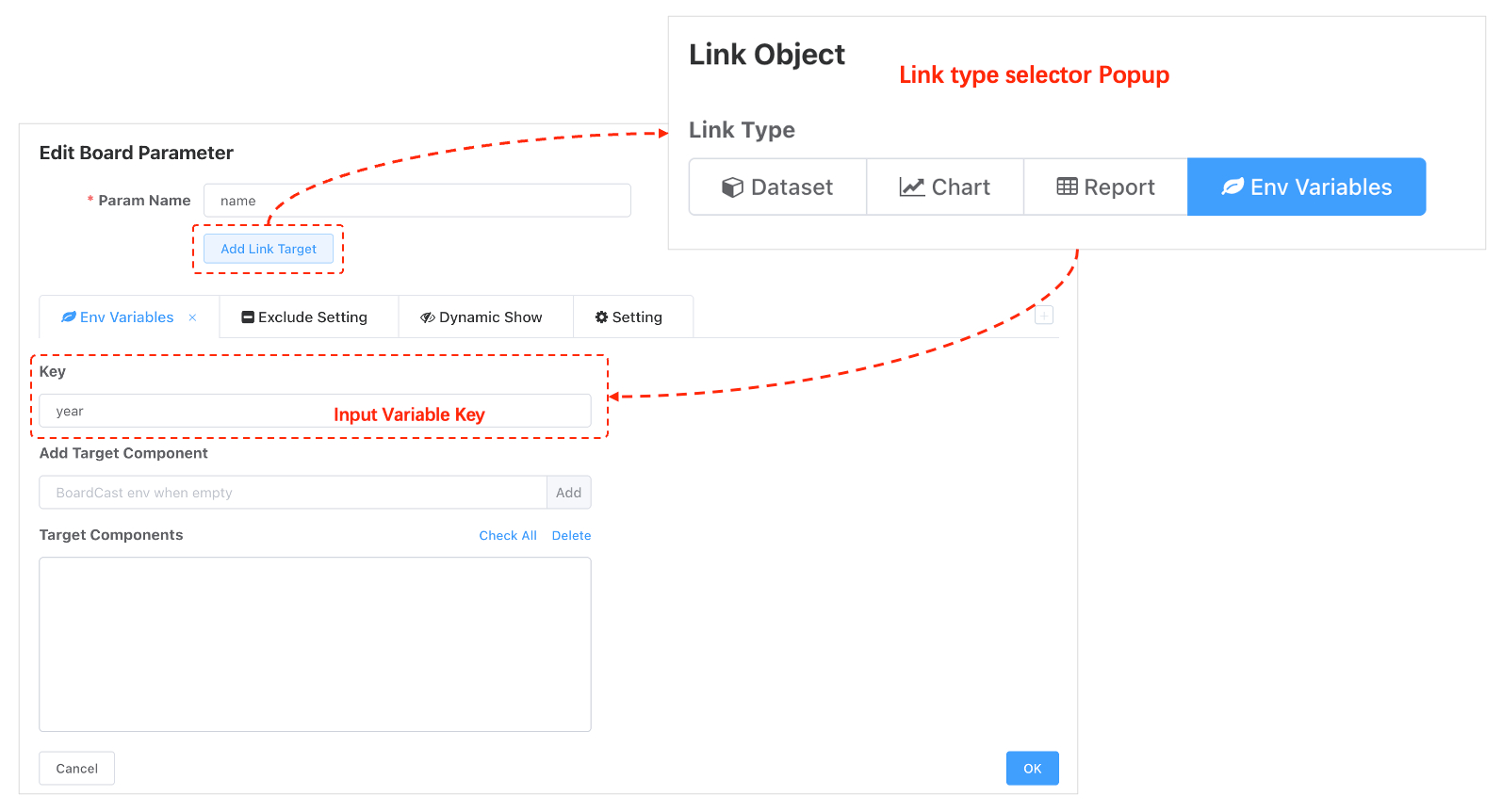
Chart Linkage
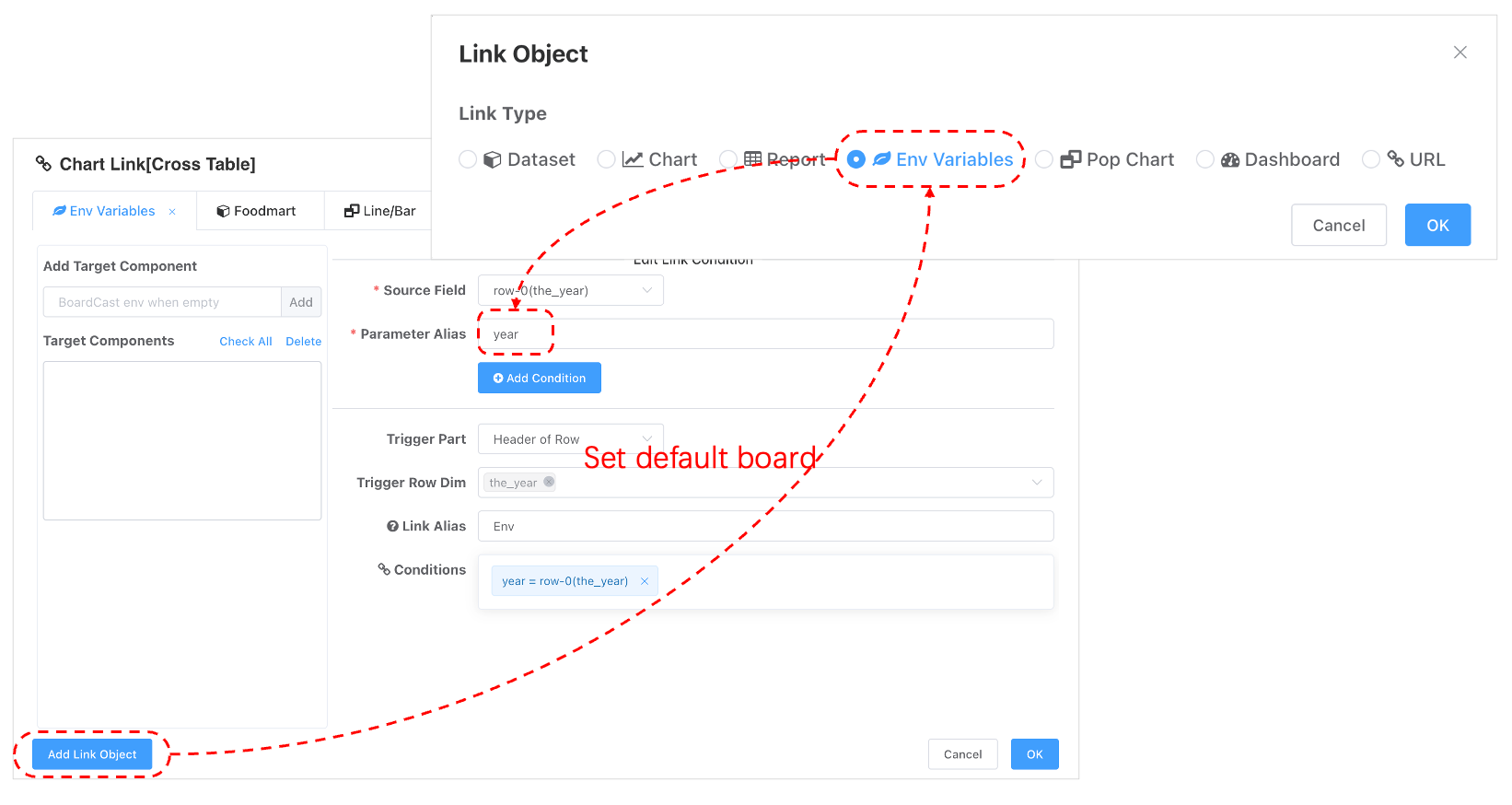
Set Variables via URL
Variables can be set via URL parameters. All URL parameters are parsed as environment variables, which is particularly useful for dashboard integration.
http://localhost:8088/?up=aa&a=%E6%B5%8B%E8%AF%95#/config/cockpit/200326104201751Multi-Dashboard Integration - Global Variables
Parameters in the URL are global and will be inherited by all dashboards in multi-dashboard integration scenarios.
http://localhost:8088/render-html.html?a=aa&country=USA
Multi-Dashboard Integration - Local Variables
- Local variables can override global variables.
- Local variables are objects.
boards=encodeURIComponent(JSON.stringify(
[
    {
        showParams: true,
        title: 'First Dashboard',
        boardId: 63,
        hiddenParamNames: [],
        filters: {"boardParams":[{"id":"5chiv3mmalw","name":"Country","type":"=","values":[]}]},
        variables: { // This variable only applies to boardId 63
          country: 'Mexico'
        }
    },
    {
        showParams: true,
        title: 'Second Dashboard',
        boardId: 64,
        hiddenParamNames: ['Country4', 'Country3'],
    }
]
))
Using Variables
In Datasets or Ad Hoc
.... Omitted other query scripts ...
  JOIN foodmart.region r ON c.REGION_ID = r.REGION_ID
  JOIN foodmart.customer d ON a.CUSTOMER_ID = d.CUSTOMER_ID
WHERE r.sales_country = '${country}'
Variable Default Values
The query above directly uses a custom variable. However, if the BI system does not pass parameters via the URL, the variable may be empty. Therefore, it is necessary to provide a default value for the variable to ensure the query runs correctly in scenarios without parameters.
.... Omitted other query scripts ...
  JOIN foodmart.region r ON c.REGION_ID = r.REGION_ID
  JOIN foodmart.customer d ON a.CUSTOMER_ID = d.CUSTOMER_ID
WHERE r.sales_country = '${country!"USA"}'
Array Variables
Retrieving the Nth Value
When a parameter associated with an environment variable is an array or assigned multiple values, you can use the built-in array UDF to retrieve a specific element from the array.
${arr.get(variable, nth, “defaultValue”)}or${arr.get(variable, nth) ! “defaultValue”}
Tip
The first parameter of the arr.get function can be non-array. For example, arr.get("a", 0) still returns "a", while arr.get("a", 1) returns blank.
For example, if a date range is associated with the environment variable dt, you can retrieve values in a query as follows:
select
       ....
  from
 where date_column between
             '${arr.get(dt, 0) ! cdt.addDay(-10,"yyyy-MM-dd")}'
         and '${arr.get(dt, 1) ! cdt.addDay(-1,"yyyy-MM-dd")}'
You can also set default values when the variable is uninitialized using the following method:
${arr.get(dt, 0, cdt.addDay(-1,"yyyy-MM-dd")) }Joining Array Variables
${arr.joinString(variable, ”defaultValues")}${arr.joinNumber(variable, “defaultValues")}
WHERE SALES_COUNTRY IS NOT NULL
   AND r.sales_country in  (${arr.joinString(country, “USA, Mexico")})
   AND b.month_of_year in (${arr.joinNumber(month, "1, 2, 3,")})

-*/} Output
WHERE SALES_COUNTRY IS NOT NULL
   AND r.sales_country in  ('USA', 'Mexico')
   AND b.month_of_year in (1, 2, 3)
Examples
Logical Script to Determine if Variables Exist
<%
  var  where = "where 1 = 1";
  if (has(township)) {
      where = where + (" AND township = '" + township + "'");
  }
  if (has(village)) {
      where = where + (" AND village = '" + village + "'");
  }
  if (has(group_name)) {
      where = where + (" AND group_name = '" + group_name + "'");
  }
%>
select *,1 as cnt from pas_wm_dz_wt ${where}
Query Template Replacement
Determine if a variable exists (has a value) and then replace the entire query SQL accordingly. Note that different SQL queries must output the same fields.
<%
  var sql;
  if (has(country)) {
      sql = 'select 1 as c';
  } else {
      sql = 'select 2 as c';
  }
%>

${sql}
Date Processing
Tip
Inside <% %> delimiters, values printed via the println function will appear in the final output. You can include comment symbols in the println content to debug template syntax correctness.
println("-- [Log] " + result);
<%
  var months = strutil.split(month!"2021-02-01", ",");
  var m2 = cdt.add("2021-02-01", 2, -1, "yyyy-MM-dd");
  var result = '';
  for(m in months){
      var monthStr = cdt.addMonth(m, -1, "yyyy-MM-dd");
      if (isEmpty(result)) {
          result = monthStr;
      }
      println("-- [Log] " + result);
      result = result + ", " + monthStr;
  }
%>

select 1 as c

-- ${month}
-- ${result}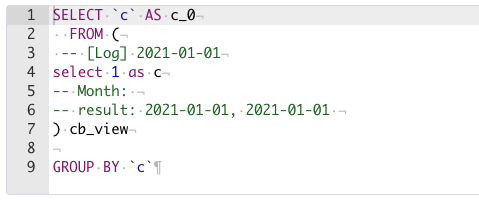
Side Effects
- For offline datasets that require caching, the cache key is the actual executed query statement after variable assignment. When variables are present, the data originally stored for one dataset is replaced with separate caches for queries corresponding to different variable values.
- Originally, one query execution and one cache write are performed. Datasets with multiple reads and writes require multiple queries and cache writes, which may negatively impact user experience with higher latency.
- Variable datasets are more suitable for data source aggregation that does not require caching.
Data Portal
Publish a branded data portal that organises dashboards into menus for business users. Covers default dashboards, menu layout, portal design, and multi-level menus.
Variable Examples
Practical variable recipes — date ranges, dynamic filters, cascading selects, and passing values into dataset queries.