
HTTP Dataset
Turn any JSON HTTP API into a dataset. Configure the request path and parameters, then map the JSON response with the object or array parser.
API Interface Dataset
Query Properties
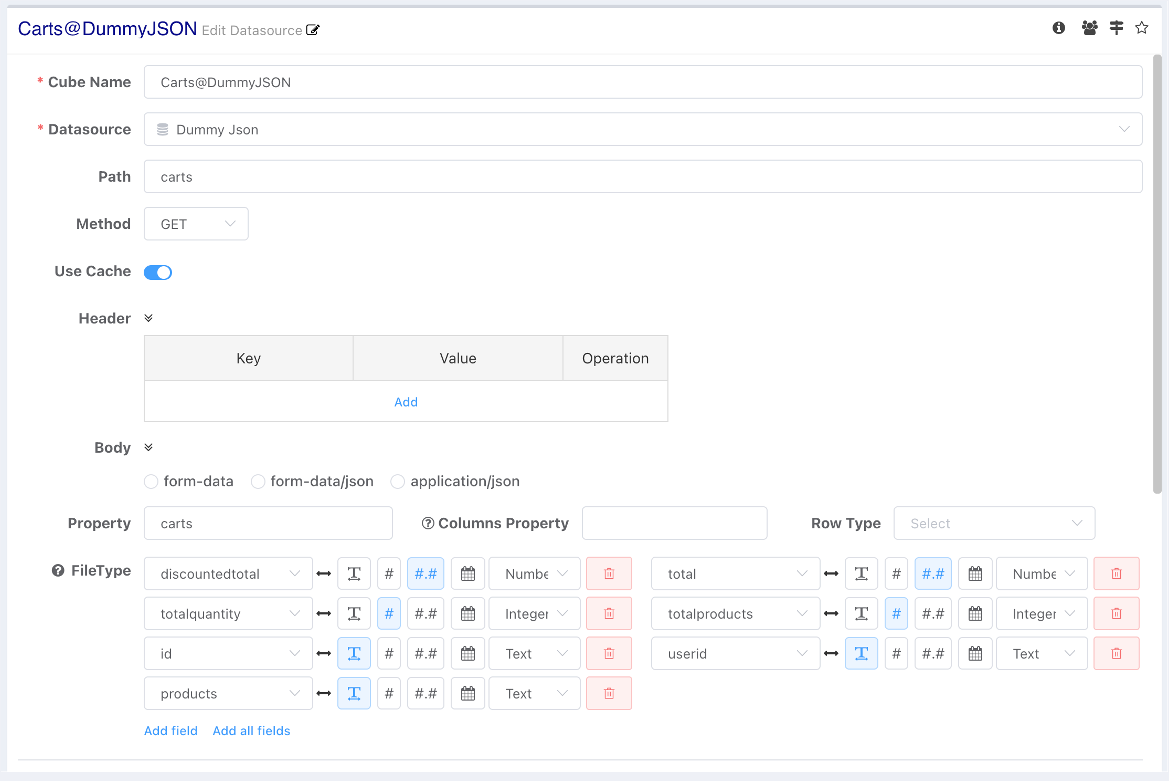
- Path: Combined with the data source service address to form the complete request address. It should not start with a slash.
- If the request path starts with
http://orhttps://, the base path in datasource will not be used.
- If the request path starts with
- Method: GET/POST
- Request Headers: Configure authentication-related information. Environment variables can be used, e.g.,
${loginName},${token}(wheretokenis a built-in variable). - Request Body: Environment variables can be used, such as those bound via dashboard parameters.
- form-data: Regular form request body.
- form-data/json: A form that simplifies form-data input when there are many parameters. Input form information in JSON format; the server automatically parses it into a regular form. Nested JSON is not supported.
{ "area":"${area!'New York'}", "timef":"${timef!'2022-05-19 00:00:00'}", "timel":"${timel!'2022-08-19 00:00:00'}", "day":"${day!'1'}", "word":"${word}" } - application/json: JSON request body data.
Using Cache
Set whether query results should be cached and reused. If environment variables are used in the request body or headers, it is recommended to disable the cache option. For details, see Side Effects of Variables.
Response Parser
JSON Object
When the response type is a JSON object, configure the parsing property (JPath) to extract data.
- Currently, only JSON-structured data parsing is supported.
- The parsing property uses JPath to extract property values. The parsing property must be a JSON array.
- When array members are JSON objects, their properties are parsed as optional dataset fields.
- Array members can also be basic data types.
- For example, if the request response structure is as follows, you can use
$.resultsto parse the result:
{
  "results": [
    "New York",
    "Los Angeles",
    "Chicago",
    "Houston"
  ],
  "success": true
}
Field of JSONObject Array
The outermost layer is a JSON object, and the data field is a JSONObject array. For this data structure,
- Only need to configure the parsing property (JPath), e.g.,
$.results:
{
  "results": [
    {
      "id": 1,
      "name": "Tom",
      "salary": 10000
    },
    {
      "id": 2,
      "name": "Jerry",
      "salary": 12000
    }
  ],
  "success": true
}
Field of Raw Data Array
Using an array format can compress data transmission volume. When the data field is an array of raw types, you need to configure:
- Parsing Property: e.g.,
$.data - Row Data Structure: Select as Array.
{
  data: [
    ['Income','Life Expectancy','Population','Country','Year'],
    [815,34.05,351014,'Australia',1800],
    [1314,39,645526,'Canada',1800],
    [985,32,321675013,'USA',1800]
  ]
}
JSON Array
If the outermost structure of the request response is an array:
- Do not configure the parsing property.
- Set the row data structure to Array.
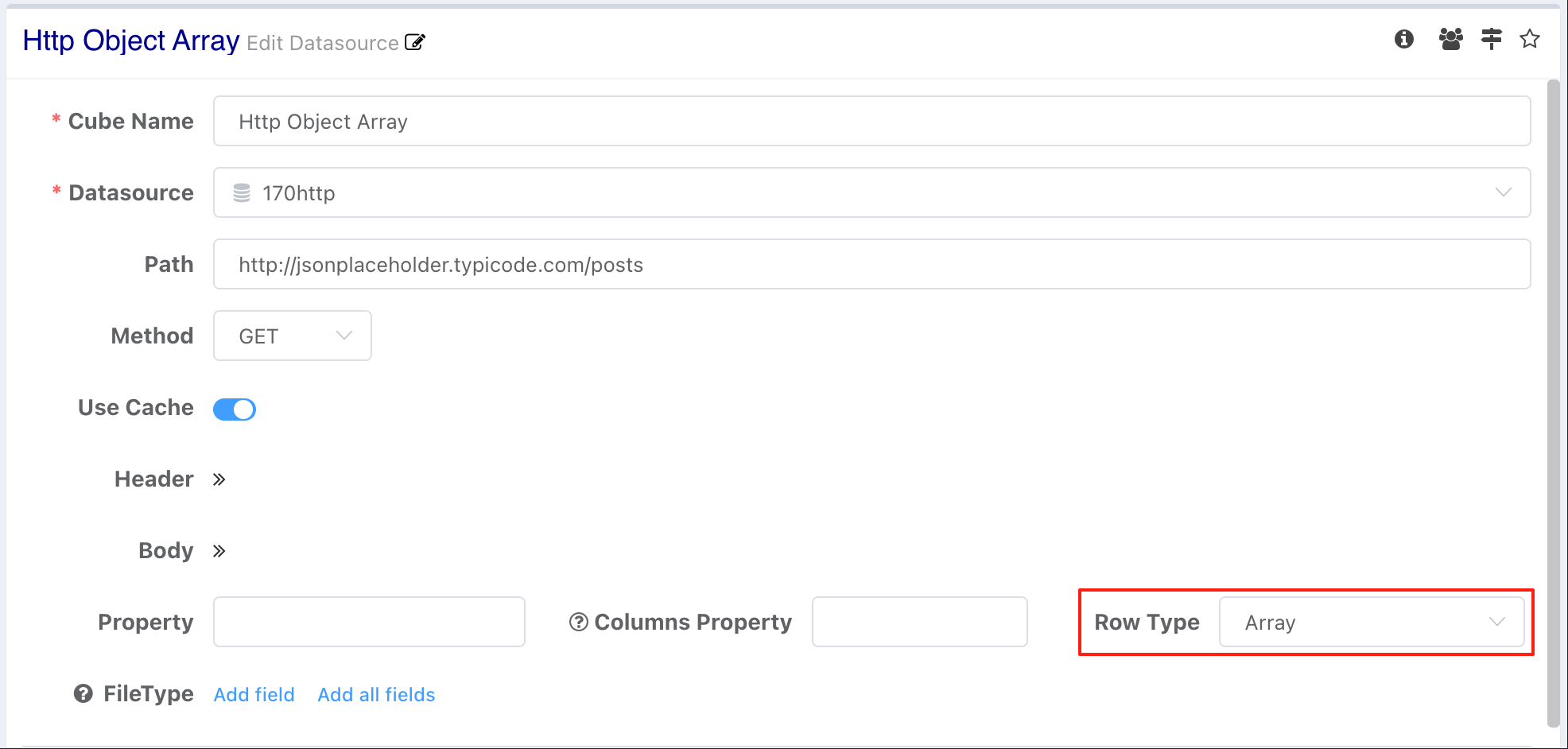
Raw Data Item
[
  [ "Income", "Life Expectancy", "Population", "Country", "Year" ],
  [ 815, 34.05, 351014, "Australia", 1800 ],
  [ 1314, 39, 645526, "Canada", 1800 ]
]
JSON Object Item
Request response structure is Array + JSONObject:
[
  {
    "userId": 1,
    "id": 1,
    "title": "sunt aut facere repellat p",
    "body": "quia et suscipit\nsuscipit recusandae consequuntur "
  },
  {
    "userId": 1,
    "id": 2,
    "title": "qui est esse",
    "body": "est rerum tempore vitae\nsequi sint nihil "
  }
]
Columns Property
For fields returned by the interface, if the response structure includes a columns field describing the data type and alias for each column in results:
{
    columns: [
        { column: 'id', type: 'number' },
        { column: 'name', type: 'string', alias: 'Name', },
        { column: 'salary', type: 'number', alias: 'Salary', },
    ],
    data: [
        {
            "id": 1,
            "name": "Tom",
            "salary": 10000
        },
        {
            "id": 2,
            "name": "Jerry",
            "salary": 12000
        }
    ]
}
Data Type
Without Columns Property configuration, text data is loaded into the cache database as strings by default. Field data types can be configured via the Data Type settings.
Field dropdown options become available after data is loaded.

Text Dataset
Build a dataset from plain text, Excel, or CSV files — uploaded or read from a path. Covers data type detection, header rows, and advanced parsing options.
Calculate Column
Calculated columns derive new fields from existing ones at query time. Covers syntax, adding calculated fields to a model, field references, and lazy evaluation.