
ChartsChart Detail
Bullet Chart
Bullet Chart / Completion Rate
| Design Area | Chart | Requirement |
|---|---|---|
| Row Dimensions | X-axis | Place 1 or more dimension nodes |
| Column Dimensions | Category | 0 or more |
| Measures | Place 2 measures. The first is actual value, the second is target value. |
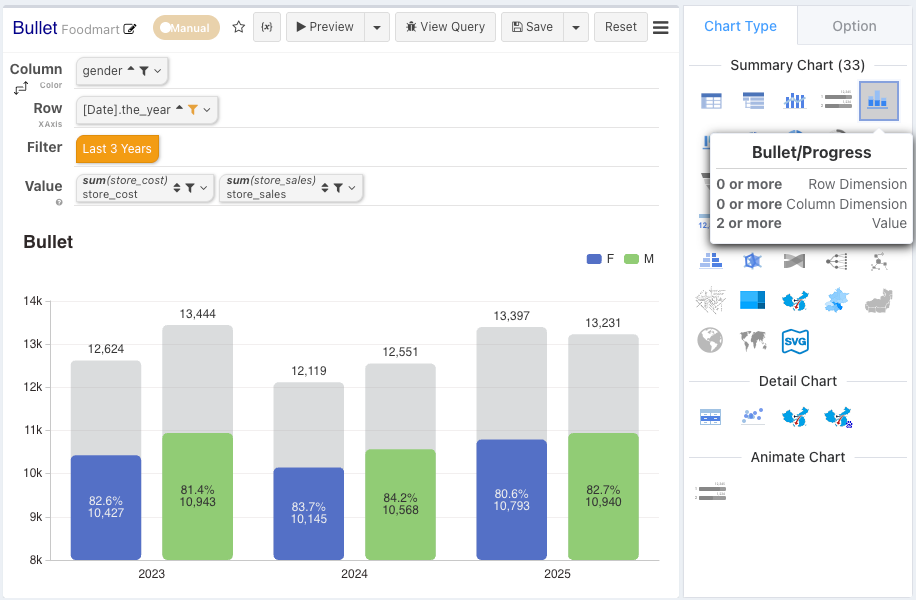
Numeric Labels
- Numeric Label-[0] controls the display of the actual value.
- Numeric Label-[1] controls the display of the target value.
Bullet Chart 0-1 Standardized Progress Bar
Use bullet charts to visualize multiple progress bars, aligning different target-value items with 0-1 standardization.
Axis Style
Please refer to Axis Style Configuration
Ranking Bar
Ranking bars sort categories by measure and show the top or bottom N with the remainder grouped — for leaderboards and top-product views.
Waterfall Chart
Waterfall charts break a starting value into the positive and negative contributions that lead to the ending value — for bridges and variance analysis.